


Planning the perfect Squid Game Halloween costume or a themed party? The final touch is that mysterious business card. You don’t need to be a graphic designer to make your own—we’ve got the free, easy-to-use templates you need to get started right now. To know more, check out JAGO189
Want the card immediately? You got it. We created a high-quality, printable squid game calling card just for fans like you. For the best result, we saved it as a PDF file. A PDF is a “ready-to-print” document designed to look sharp and clear when you print it, not blurry like a regular image sometimes can.
Getting this from your screen to your hand takes less than two minutes. It’s a simple three-step process anyone can follow:
- Click here to download the squid game card pdf.
- Open the file on your computer (it should open automatically).
- Press “Print” and you’re all set!
You now have an authentic-looking prop for your costume or the perfect invitation for your party. For an extra professional touch, try printing this free squid game card on thicker paper, often called “cardstock,” to give it the feel of a real business card. Now you’re ready to start the games.
What Do the Squid Game Card’s Symbols and Font Mean?
At first glance, the circle, triangle, and square on the front of the Squid Game card might just seem like generic shapes. However, they hold a hidden meaning that connects directly to the show’s Korean roots. The symbols are actually letters from Hangul, the Korean alphabet. The circle represents the letter ‘ㅇ’ (which sounds like “O”), the triangle is part of ‘ㅈ’ (“J”), and the square is ‘ㅁ’ (“M”). Together, O-J-M are the initials for Ojingeo Geim (오징어 게임), which is the Korean name for the Squid Game itself.
The text on the back of the card, featuring that mysterious phone number, has an equally specific design. While the exact font used by the show’s production is custom, fans have created a nearly identical replica called Game of Squids. This typeface perfectly captures the simple, slightly digital, and unsettling vibe of the original invitation. Using this font is the key to making any custom card feel instantly authentic, as its clean lines are now inseparable from the show’s iconic look.
Speaking of that phone number, the one originally shown in the series turned out to be a huge problem. It was a real, active number belonging to a person in South Korea who was suddenly flooded with thousands of calls and text messages from curious fans. The situation became so overwhelming that Netflix eventually had to digitally edit the number out of the scenes in later versions of the show. It’s a fascinating, if cautionary, tale about a fictional world colliding with our own.
Now that you know the secret behind the symbols and the story of the phone number, you have all the details you need to create a truly convincing replica. Instead of calling a random stranger, the real fun is in customizing the card for your own event, like a themed party or Halloween gathering.
How to Make a Custom Squid Game Party Invitation for Free
Creating your own custom Squid Game invitation is the perfect way to get guests excited for a themed party, but there’s a common roadblock: how do you add your own details—like the date, time, and a unique “phone number”—to a pre-made design? You can’t just type on a picture you saved from the internet. This is where you need the right tool, and luckily, the best one is completely free and requires no design experience.
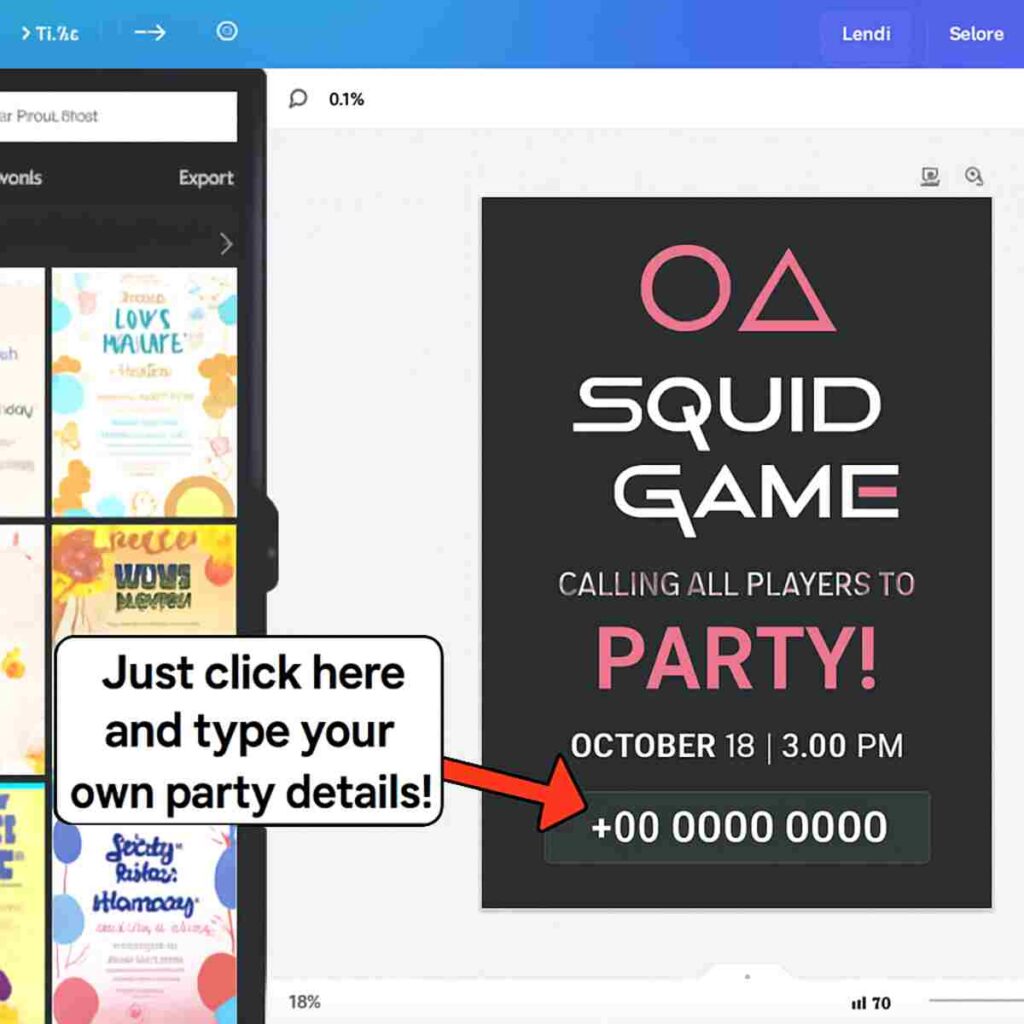
The easiest way to do this is with a website called Canva. If you haven’t heard of it, Canva is a simple, online design studio. You don’t have to download any software, and its basic features are free to use. It provides pre-made designs, called templates, and lets you edit specific parts, like the text, without messing up the rest of the image. It’s perfect for turning the iconic card into your personal party invite.
This is where an “editable template” becomes so important. Unlike a regular image file (like a JPG), which is flat and unchangeable, an editable template is built in layers. The background, the shapes, and the font are all set up for you, but the text box for the phone number is left unlocked. This means you can simply click on it and type in whatever you want, whether it’s your party’s RSVP details or a funny inside joke.
To make this process as simple as possible, we’ve created a free editable Squid Game invite just for you. When you open our template in Canva, you’ll see the familiar card design, ready to go. All you need to do is change the text to fit your event.
You’re just a few clicks away from having a professional-looking invitation that will blow your friends away. Customizing your invite might sound technical, but with a template, it’s genuinely as simple as writing an email. Here’s a walkthrough of the exact steps to personalize and download your finished design.
Your 5-Click Canva Tutorial to a Custom Invite
Ready to turn that template into your own custom invitation? Using our template on Canva is the fastest and most reliable way to create your own Squid Game calling card because it gives you total control without needing any design skills. It’s the perfect, free tool for the job.
To make this a breeze, we’ve broken down the entire process into five simple steps. Follow along, and you’ll have a professional-looking, ready-to-print file in about two minutes.
Here’s exactly what to do:
- Open the Template & Sign Up: Click our template link from the previous section. If you’re new to Canva, it will ask you to create a free account—it only takes a moment and doesn’t require any payment information.
- Find and Select the Text: Once the card design loads on your screen, simply double-click the phone number. The text will become highlighted, showing you it’s ready to be edited.
- Type Your Custom Details: Go ahead and type in your party’s date, a unique RSVP phone number, or any other details you need. The text will update automatically.
- (Optional) Add a Splash of Color: With your text still selected, look for a button in the toolbar at the top that looks like an ‘A’ with a rainbow bar underneath it. Click it to open a color palette and change your text to any color you like.
- Download for High-Quality Printing: This is the most important step! Click the Share button in the top-right corner, then choose Download. Under the “File type” menu, make sure to select PDF Print.
You might see other options in the download menu like JPG or PNG, which are great for sharing images online. For printing, however, the PDF Print option is the one you want. It’s a special container that locks in all the high-quality information—the sharp lines of the shapes and the clean edges of your text—so that your home printer can read it perfectly. This simple choice is the secret to avoiding a blurry or pixelated result.
You’ve successfully created and saved your custom invitation to your computer. Now that you have the digital file, the final step is bringing it into the real world by printing it to look and feel authentic.
How to Print Your Card to Look and Feel Authentic
Having the perfect digital file is step one, but making your card feel like it was handed to you on a subway platform is all about the paper and finishing touches. A regular sheet of printer paper will work in a pinch, but it can feel flimsy. To give your DIY Squid Game business card some real weight and make it convincing, the secret is choosing a paper that feels substantial in your hand. This simple upgrade is what separates a good prop from a great one.
For that authentic feel, you’ll want to use cardstock. If you’ve ever held a greeting card or a postcard, you already know what this feels like. It’s simply a thicker, more durable type of paper that holds its shape and gives your print a professional quality. You can find packs of white or off-white cardstock at any office supply store, craft store, or even in the stationery aisle of large supermarkets. When you print your PDF file, just make sure to load this paper into your printer instead of your usual copy paper.
Once printed, cutting the card to the right size is the next crucial step for realism. The official Squid Game card dimensions are the same as a standard U.S. business card: 3.5 inches wide by 2 inches tall. Measuring and trimming your print to this exact size makes it instantly recognizable and feel legitimate. For the cleanest edges, use a ruler and a craft knife or a simple paper cutter. If you only have scissors, take your time to cut along the lines as straight as you can.
Finally, if you want to go the extra mile, you can give your printable Squid Game calling card an aged, mysterious look. This trick is incredibly easy and uses something you probably already have at home: a tea bag. Just brew a cup of black tea, let the tea bag cool down so it’s just damp and not dripping, and then lightly dab it along the edges and corners of your card. Let it dry completely, and you’ll have a prop that looks like it’s been through a few things. With a card that now looks and feels the part, you’re ready to put it to use.
5 Creative Ways to Use Your Squid Game Card Template
Now that you have an authentic-looking prop in your hands, the fun can really begin. That little card is more than just a piece of paper; it’s a conversation starter and a key to unlocking all sorts of creative fan projects. Whether you made it for a specific event or just for the fun of it, you might be surprised by how many uses it has.
Beyond the obvious Halloween costume accessory, this simple DIY squid game business card can be used in several clever ways. If you’re looking for inspiration, here are a few of our favorite funny squid game ideas to get you started:
- The Ultimate Costume Prop: This is the classic use. Tucking the card into your wallet or handing it out while dressed as the Salesman adds that final, perfect detail that will make your costume instantly recognizable and impressive.
- Unforgettable Party Invitations: Planning a Squid Game watch party or a themed birthday? Use the editable template to change the phone number to your own RSVP number. It’s one of the most unique squid game party invitation ideas and is guaranteed to get your guests talking before the party even starts.
- A Geeky Bookmark: Are you a fan who also loves to read? The card’s sturdy, rectangular shape makes it a perfect bookmark. It’s a subtle nod to the show that you can enjoy every day.
- A Viral Social Media Gag: Leave the card in funny, unexpected places—on your cat’s bed, next to your morning coffee, or “dropped” in a public park—and snap a picture. It’s a great inside joke for your followers and a surefire way to get comments.
- A Memorable Gag Business Card: Keep a few in your wallet to hand out to friends as a joke. When someone asks what you do, just silently hand them the card and see how long it takes for them to get it. It’s a hilarious icebreaker for fellow fans.
From a party centerpiece to a personal inside joke, your card is a versatile piece of fandom. It’s a small prop that carries a big cultural impact, making it the perfect tool for sharing your love of the show creatively and memorably.
You’re Invited: Your Squid Game Card is Ready
Creating your own authentic prop doesn’t require a graphic design background. Just a few minutes ago, that iconic card was something you only saw on screen. Now, you have the know-how and the tools to bring your own version to life, turning a simple idea into a tangible prop you can hold in your hand.
Whether you needed a quick costume piece and grabbed the ready-to-print file, or you designed the perfect DIY Squid Game invitation using the easy-to-edit template, you’re officially ready for the games. You’ve seen just how simple it is to create an authentic-looking prop without any special skills or complicated software.
Your finished Squid Game craft is more than just paper; it’s your ticket to a more immersive fan experience. We’d love to see what you made. Are you handing out invitations for a themed party or completing your Halloween costume? Share your creation online and show everyone what you accomplished.